Presented at Nextflow Summit 2026. Technical architecture behind the talk — for bioinformaticians who know Nextflow but are new to agentic tooling.
The Problem
One person. Every role: sysadmin, developer, data engineer, analyst, collaborator.
Multiple datasets. Hundreds of samples each. Researchers arrive with new hypotheses needing a published tool wrapped into a runnable pipeline — not in two months, now. Development time becomes the bottleneck, not the science.
AI agents can close that gap — but only if you invest in context first. Speed comes not from model intelligence but from encoding what to do before the agent starts.
Available @ https://github.com/ghobriallab/pipelines
Architecture Overview
Three tiers:
- Agents — autonomous workers that execute tasks, spawn sub-agents, and handle failures
- Skills — cross-cutting resolvers invoked inline (no side effects, no sub-agent spawn)
- Commands — shell scripts for deterministic scaffolding
One sentence triggers the whole chain: Trinity, I need a nextflow pipeline using https://github.com/RabadanLab/arcasHLA.
Nextflow is a workflow orchestration framework for scalable and reproducible scientific pipelines.
Trinity: The Orchestrator
Trinity is the only entry point for pipeline creation. It runs six phases in order, with explicit parallelism and sequential gates built in.
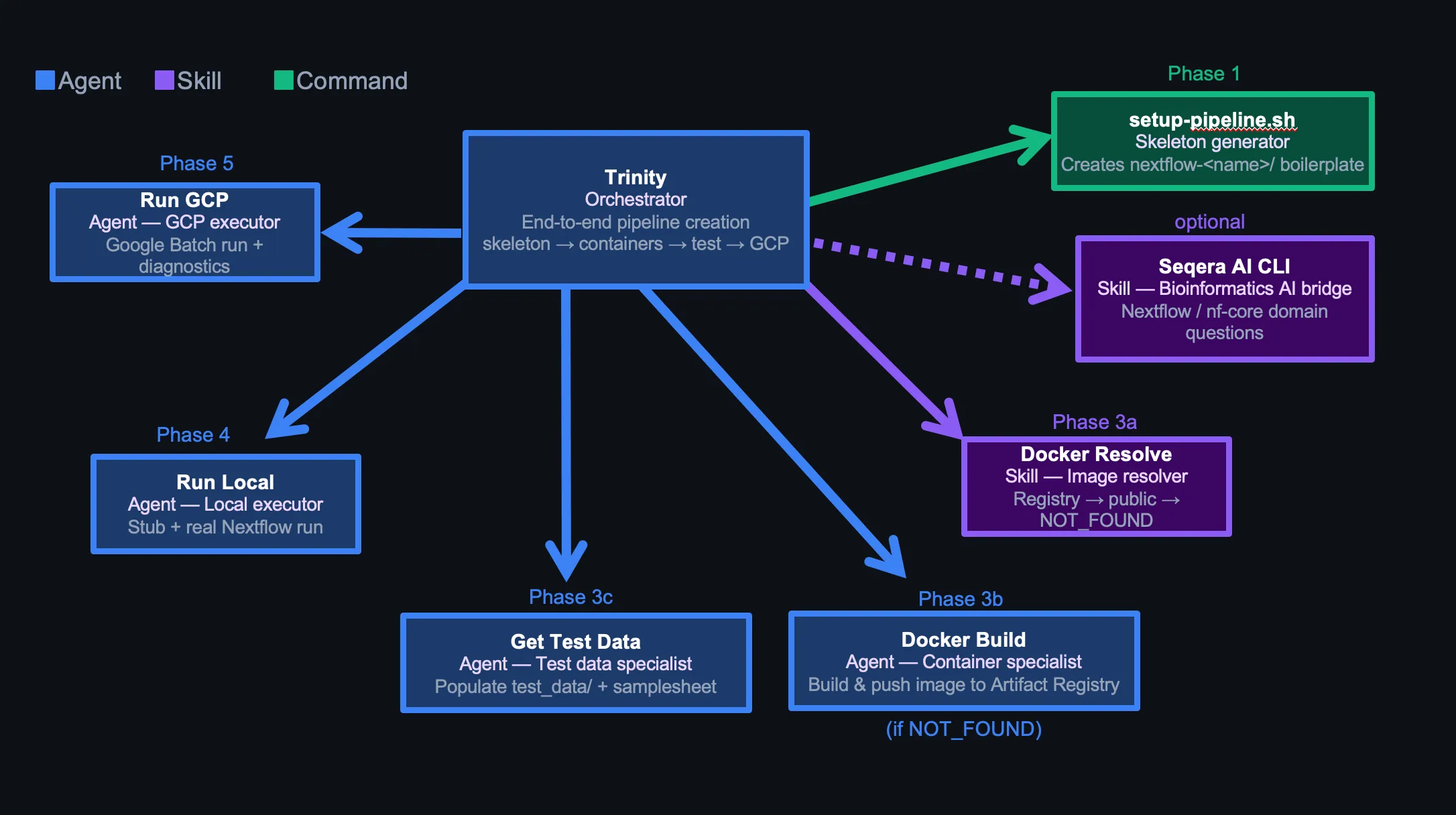
Phase Flow
Phase 0: Parse pipeline name and tools from user message
Phase 1: Create skeleton (setup-pipeline.sh) or verify existing one
Phase 2: Confirm pipeline intent (input type, tool list)
Phase 3a: Resolve container image (docker-resolve skill)
Phase 3b: Build custom container [conditional, only if NOT_FOUND]
Phase 3c: Prepare test data [always, parallel with 3b if applicable]
Phase 4: Local run — stub then real [sequential, must pass before Phase 5]
Phase 5: GCP run — Google Batch [sequential]
Phase 6: Final report
Phases 3b and 3c run in parallel when a Docker build is needed — container build and test data prep are independent. Phases 4 and 5 are sequential — a failing local run blocks GCP.
Optional: Seqera AI for Nextflow-specific problems
Trinity has the Seqera AI CLI as a fallback for DSL2 edge cases, nf-core module patterns, or Batch executor behavior it can’t resolve from context alone:
seqera ai --headless "How do I emit two outputs from the same process with different types in DSL2?"Runs headless, returns to Trinity without breaking the conversation chain. Used sparingly — credits are limited.
When to use vs. WebSearch:
- WebSearch: public docs, GitHub issues, Stack Overflow — free, fast
- Seqera AI: Nextflow-specific reasoning, nf-core module internals, Batch executor nuance — use when WebSearch returns conflicting or outdated results
Critical: docker-resolve is a skill, not a tool call
docker-resolve is listed in Trinity’s frontmatter as a preloaded skill:
---
name: trinity
skills:
  - docker-resolve
---
Trinity executes docker-resolve logic directly via Bash — not via the Skill tool. Invoking the Skill tool mid-conversation emits a response to the parent agent and terminates Trinity prematurely — Phases 3c, 4, and 5 never run.
The parent assistant has a matching hard rule: never pre-run docker-resolve before spawning Trinity. Pre-supplying the image causes Trinity to skip Phases 3c–5 entirely.
docker-resolve: The Container Skill
Pure lookup, no side effects. Three checks in order, stops at first success.
Check 1: Artifact Registry (custom images)
gcloud artifacts repositories list \
  --project=$GCP_PROJECT \
  --format="value(name)"
Fuzzy-match against the tool name. For each matching repo, list images and verify reachability with docker manifest inspect. Prefer pinned version over latest.
Check 2: Existing container directives
For each container directive in pipeline modules and nextflow.config, verify the URL is live. Wave URLs via curl --head, others via docker manifest inspect.
Check 3: Public registries
Seqera Wave → biocontainers → nf-core quay.io. Always verify before returning.
Output
STRATEGY: USE_EXISTING_CUSTOM | USE_EXISTING_PUBLIC | POPULATE_PUBLIC | NOT_FOUND
IMAGE_URL: <full image URL, or "none" if NOT_FOUND>
NOTES: <what was checked>
NOT_FOUND triggers docker-build. Otherwise Trinity records the URL and continues.
docker-build: The Container Agent
Only spawned when docker-resolve returns NOT_FOUND. Reads the tool’s README, writes a Dockerfile, builds, and pushes.
Always: --platform linux/amd64. GCP Batch VMs are x86_64. Apple Silicon Macs must still target x86_64 or the container won’t run on Batch.
One repo per tool, not per pipeline. Artifact Registry repos are named after the tool (arcashla, cellranger), not the pipeline. Containers reuse across pipelines.
Baked-in reference databases. Some tools (arcasHLA) need reference data downloaded at build time:
- Install
git-lfsif the reference usesgit clone— without it, large repos silently download pointer files only - Pin the reference version (
--version X.Y.Z) —--latestbreaks reproducibility
get-test-data: The Test Data Agent
Runs in parallel with docker-build. Populates test_data/ with minimal, realistic inputs.
Attempt Order
- nf-core module fixtures — curated table of known test files per tool
- Tool’s own GitHub repository — look for test/ or data/ directories (max 3 API calls)
- nf-core test-datasets catalog — grep by input type (FASTQ paired/single, BAM, VCF)
- Synthetic data — Python FASTQ generator or
seqtk subsample(asks user first)
Output contract
test_data/samplesheet_test.csvwith exact column names expected bymain.nf- 2 samples (
sample1,sample2) — enough to exercise branching - Relative paths inside
test_data/ - All referenced files exist and are non-empty
run-local: The Local Executor
Stub first, then real. Never proceeds to GCP until local passes.
# 1. Stub run — validates DSL2 syntax and channel wiring without running tools
nextflow run main.nf -profile test -stub

# 2. Real run
nextflow run main.nf -profile test
On failure, the agent attempts one fix per error type (max 3 attempts total):
| Error pattern | Fix |
|---|---|
samplesheet not found | Correct path in nextflow.config test profile |
Unknown parameter | Add param to nextflow.config params block |
No such variable | Fix module path or channel reference in main.nf |
| Stub syntax error | Fix stub: block in process module |
Success gate: Status : SUCCESS in Nextflow log + results_test/ non-empty.
run-gcp: The Cloud Executor
Pre-flight checks before any Nextflow command. All must pass:
gcloud auth list— active accountgcloud services list— Batch API enabledgsutil ls $GCP_WORK_DIR— work bucket accessibledocker manifest inspect <image>— container reachable from GCP- Grep pipeline configs for placeholder strings like
YOUR_PROJECTorCHANGEME - Executor is
google-batch(not deprecatedgoogle-lifesciences) - If input files >150 GB: set
stageInMode = 'copy'and disk to 500 GB
Exit codes 125, 14, and 50001 → retry, not failure. Batch uses spot VMs by default; preemptions are expected.
Environment Variables: The Adaptability Layer
Every agent reads .env at startup. Same agent definitions work across different GCP projects, registries, and filesystem layouts — no agent code changes needed.
# .env
GCP_PROJECT="team-pipelines"
GCP_REGION="us-east1"
GCP_WORK_DIR="gs://team-pipelines/scratch"
ARTIFACT_REGISTRY="us-docker.pkg.dev/team-pipelines"
PIPELINES_DIR="."
DOCKER_DEFAULT_PLATFORM="linux/amd64"
To port to a different lab or cloud account, change .env — nothing else.
One hostname rule: $ARTIFACT_REGISTRY already contains the full registry prefix. Never derive a regional variant:
us-docker.pkg.dev/team-pipelines      ← correct, verbatim from $ARTIFACT_REGISTRY
us-east1-docker.pkg.dev/team-pipelines ← wrong, never derive from $GCP_REGION
Without this rule, the model derives a plausible-looking but wrong hostname. It’s repeated verbatim in .memory/containers.md, docker-resolve, and docker-build.
The Memory System
.memory/ is a concept-based knowledge base loaded at agent startup — not embedded into prompts.
.memory/
  overview.md      — existing pipelines, quick start
  structure.md     — DSL2 layout, naming conventions
  templates.md     — process templates, samplesheet patterns
  commands.md      — how to invoke Trinity, setup-pipeline, add-process
  workflow.md      — step-by-step dev flow
  testing.md       — nf-test patterns, test data sources, checklists
  development.md   — VS Code + Nextflow LSP setup
  patterns.md      — input handling, branching, output management
  gcp.md           — GCP config, error codes, resource patterns
  containers.md    — container priority, Dockerfile patterns, known images
Agents read only the files relevant to their phase — run-gcp reads gcp.md, docker-build reads containers.md. Loading everything into every agent wastes tokens and dilutes focus.
The files encode lab-specific conventions no generic model knows:
- Use
pixi run nextflownot barenextflow $ARTIFACT_REGISTRYalready includes the project — never append$GCP_PROJECT- GCP Batch spot codes: 125, 14, 50001 → retry
- DSL2: process names UPPERCASE, directory names lowercase_underscore
Permissions: Bounding the Blast Radius
Agents run Bash autonomously. Without explicit limits, the blast radius is unbounded.
.claude/settings.local.json uses an allowlist-deny model:
{
  "permissions": {
    "allow": [
      "Bash(docker *)",
      "Bash(gcloud artifacts *)",
      "Bash(pixi run *)",
      "Bash(nextflow *)",
      "Bash(git *)"
    ],
    "deny": [
      "Bash(rm -rf *)",
      "Bash(rm -r *)",
      "Bash(rm *)"
    ]
  }
}
rm in any form requires user confirmation. Everything outside the allow list also prompts — but the deny list catches destructive cases even if a wildcard allow is added later.
Three Hard Rules
Rule 1: Never pre-run docker-resolve before spawning Trinity.
It’s tempting to resolve the container first and pass the URL in. Don’t. Trinity skips Phases 3c, 4, and 5 when the image is pre-supplied — no test data, no local run, no GCP run.
Rule 2: Spawn Trinity exactly once per request.
One Agent(subagent_type: "trinity", ...) covers all six phases. Each spawn starts fresh — splitting across multiple spawns breaks state.
Rule 3: Context is the product.
Speed comes from what the model knows before it starts: .memory/ files encoding lab conventions, .env resolving GCP paths, agent instructions listing failure modes and fixes. Writing those files is the engineering work. An agent without context makes the same mistakes as a model with none.
Tips for Replication
Start minimal. Trinity + docker-resolve + run-local is enough to validate the pattern. Add run-gcp only after local is reliable.
Write .memory/ before writing agents. An agent that knows your container registry hostname, package manager, and GCP project structure makes far fewer wrong turns.
Set deny rules before enabling autonomous runs. Add Bash(rm *) to the deny list on day one. Agents cleaning up failed builds will delete things you didn’t intend.
One container repo per tool. First pipeline builds and pushes. Every subsequent pipeline finds it via docker-resolve Check 1. Reuse compounds.
Preload skills as frontmatter, not inline invocations. If an agent must not emit a standalone response mid-conversation, load the skill via frontmatter and execute its logic directly with Bash — not via the Skill tool.
Repository
Full agent configuration lives in the Ghobrial Lab pipelines repository. .claude/ contains agent definitions, skills, and settings. .memory/ contains the knowledge base. The model is the executor — the context is the system.